

Identity and Access Management (IAM) is the framework of policies, processes, and technologies that ensures the right people have the right access to the right resources at the right time. IAM answers three questions:
Who are you?
Can you prove it?
What are you allowed to do?
As corporate resources spread across cloud providers, mobile devices, and hybrid environments, identity becomes the one constant that follows users wherever they go — whether they’re accessing Office 365, Salesforce, or NetSuite. The identity lifecycle sits at the heart of effective IAM: provisioning accounts when employees join, adjusting permissions when they change roles, and revoking access when they leave.
What IAM Means in Cyber Security
Identity and access management in cybersecurity functions as a core security control that determines who can interact with your systems and data. When applications live in the cloud, and employees work remotely, traditional network walls no longer exist — identity has become the new security perimeter.
Credential theft now accounts for one out of every five data breaches. Stolen credentials offer attackers a direct path into your environment. Phishing attacks target passwords, credential stuffing attacks try username-password combinations leaked from other breaches, and social engineering tricks employees into revealing authentication information.
How IAM Works: Key Components & Architecture
Identity and access management rely on several components working together to verify identities and enforce access policies:
- Authentication: Verifies that you are who you claim to be. Modern authentication often requires multiple factors — something you know (a password), something you have (a phone receiving a code), or something you are (a fingerprint). Multi-factor authentication (MFA) strengthens security because attackers who steal a password still can’t access the account without the second factor.
- Authorization: Just because the system confirms someone’s identity doesn’t mean they should access everything — authorization determines what authenticated users can do. Authorization policies define which applications, files, and data individuals can use based on their role, department, location, and device.
- Identity directories and Identity Providers (IdPs): Serve as the central source of truth for user identities and their attributes. Cloud-based identity providers like Azure AD (now Entra ID) and Okta have largely replaced traditional on-premise Active Directory as the authoritative identity source.
- Single Sign-On (SSO): Lets users authenticate once and gain access to multiple applications without repeatedly entering credentials. SSO improves security and user experience; users don’t need to remember dozens of passwords, which reduces password reuse and weak password creation.
- Federated identity: Extends authentication across organizational boundaries using standards like SAML, OAuth, and OpenID Connect (OIDC). When you “Sign in with Google” on a third-party website, you’re using federated identity.
- Governance, audit, and entitlements: Ensure IAM remains secure over time. Governance capabilities track who has access to what and whether they still need it. Automated access reviews prompt managers to certify that their team members’ permissions remain appropriate. Audit logs capture every authentication attempt and authorization decision.
The Identity Lifecycle
The identity lifecycle describes how user accounts move through phases from creation to deletion. And effectively managing this lifecycle can help prevent some of the most common IAM security gaps.
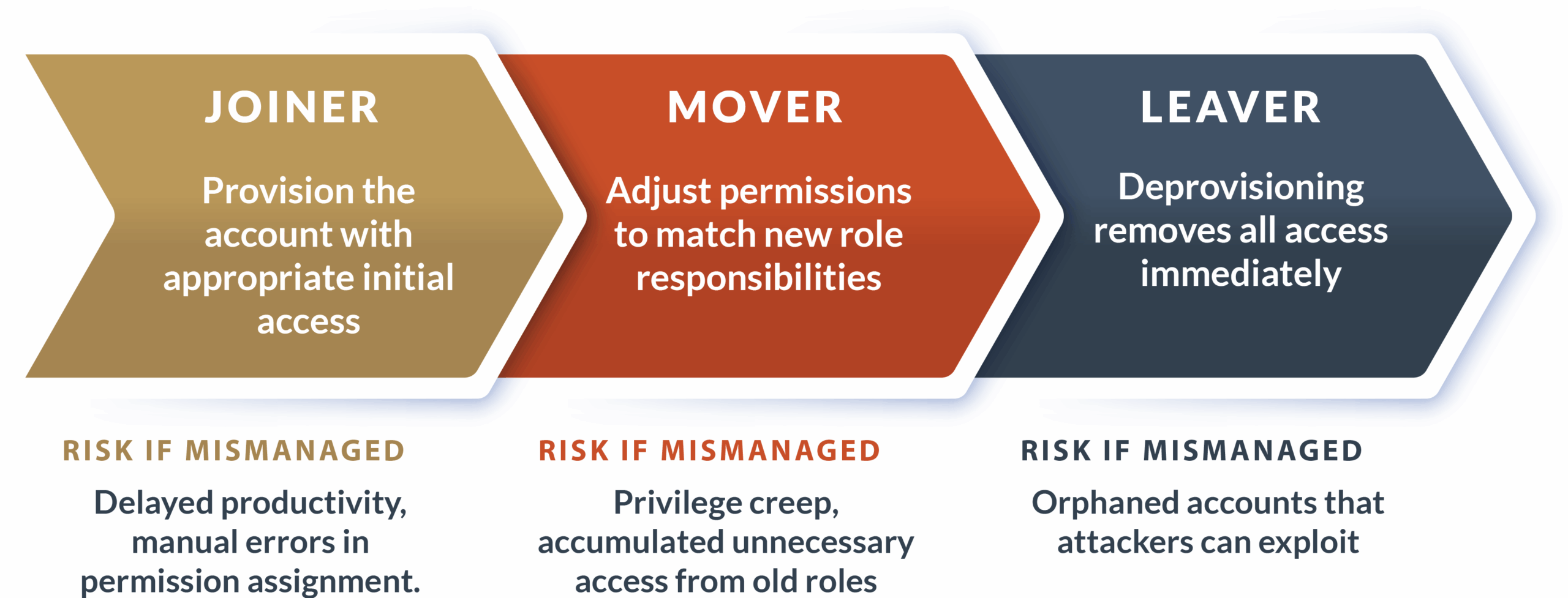
Modern IAM platforms automate provisioning through HR system integrations. When an employee joins, the platform creates accounts across all applications immediately. When employees leave, automated deprovisioning restricts access across the entire system on the same day, whereas manual processes can take days or weeks.
Orphaned accounts — accounts that remain active after users leave — are serious security risks because attackers target these forgotten credentials. Access reviews catch what automation misses, prompting managers to verify their team members still need current permissions and identify privilege creep from previous roles.
IAM in Cloud & Hybrid Environments
Cloud identity and access management operates differently from traditional on-premise IAM. Your on-premise Active Directory may manage employee identities, but your cloud applications don’t trust it directly. Identity providers bridge this gap through directory synchronization and cloud authentication. Specifically:
SCIM (System for Cross-domain Identity Management): Provides standardized automated provisioning between identity providers and cloud applications. When you add a user in your IdP, SCIM automatically creates corresponding accounts in connected SaaS applications. When you deactivate an account, SCIM propagates that change across your cloud ecosystem within minutes.
Cloud misconfigurations: Create serious IAM security gaps that don’t exist in traditional environments. Overly permissive cloud IAM policies, publicly accessible storage buckets, and weak authentication requirements frequently expose sensitive data. In fact, experts found that improperly configured cloud services accounted for nearly one-quarter of cloud security incidents — the second-most-common attack vector, behind credential theft.
Hybrid identity: This combination of on-premises and cloud identity systems introduces unique challenges. When you deactivate an employee’s account in your internal systems, it may take time to sync that change to the cloud, leaving a window during which they still have access. Managing logins becomes more complicated when some applications check credentials against your internal servers, while others verify credentials with cloud providers. You also need to coordinate MFA and password policies across both environments to avoid security gaps.
Why IAM Matters: Benefits & Business Value
Effective identity and access management delivers measurable security improvements and operational efficiencies that directly impact your bottom line and risk profile. The benefits of identity and access management include:
- Reduced breach risk: Strong authentication with MFA blocks credential-based attacks, which drive the majority of successful breaches. Automated deprovisioning closes access for terminated employees before they can misuse credentials. Least privilege policies limit the damage when accounts are compromised.
- Automated provisioning and deprovisioning: Eliminates manual account management overhead. In-house or managed IT services teams no longer manually create accounts across dozens of applications when new employees join. HR system integration triggers automatic account creation and permission assignment.
- Compliance requirements: HIPAA, SOC 2, and PCI DSS mandate specific IAM controls — and auditors want proof that you know who accessed what data and when. Modern IAM platforms generate the compliance reports auditors demand with minimal manual effort.
- Better visibility and governance: Emerges when IAM centralizes identity data from disparate systems, letting you see all applications a specific user can access. You can spot patterns suggesting compromised accounts — things like login attempts from unusual locations, access at odd hours, or rapid-fire authentication failures.
- Lower operational overhead: SSO dramatically reduces help desk burden by eliminating password-related calls, which typically account for 40% of help desk tickets. Users who authenticate once to access all applications can stop trying to remember which password goes with which system. Small businesses and enterprise organizations can easily save tens of thousands of dollars by redirecting help desk resources to higher-value work.
- Zero Trust architecture: Requires strong IAM as its foundation. Zero Trust treats every access request as potentially hostile and extensively verifies before granting access. You can’t implement Zero Trust without the robust authentication and granular authorization that IAM provides.
IAM Risks, Threats & Common Failures
Even well-designed IAM implementations face threats. Identity and access management risks include:
- Identity sprawl occurs when users accumulate multiple identities across different systems and shadow IT solutions. Each separate identity creates opportunities for inconsistent security controls and deprovisioning gaps.
- Role explosion and privilege creep occur when organizations create hundreds of highly specific roles, making them difficult to manage. Users retain permissions from previous roles when they move to new positions.
- MFA fatigue attacks exploit push notification-based MFA. Attackers send repeated MFA push notifications to victims’ phones, hoping they’ll eventually approve one to stop the alerts. Some attacks combine this with phone calls impersonating IT support.
- Misconfigured SSO and MFA create security gaps while providing a false sense of protection. SSO implementations that don’t enforce MFA for all connected applications leave entry points for attackers.
- Shadow IT identity stores emerge when departments adopt cloud applications without IT involvement, maintaining separate user directories that IAM systems don’t manage.
- Hybrid identity drift describes the gradual divergence between on-premise and cloud identity systems. Sync failures mean changes made in one environment don’t reflect in the other.
IAM Solutions & Tools: What Today’s Platforms Offer
Modern IAM platforms go far beyond basic username-password authentication:
| IAM category | Purpose | Key tools |
|---|---|---|
| IAM | Broad identity and access management for all users | Azure AD (Entra ID), Okta, OneLogin |
| PAM (Privileged Access Management) | Secures high-privilege administrator accounts | CyberArk, BeyondTrust |
| IGA (Identity Governance and Administration) | Access reviews and compliance reporting | SailPoint, Saviynt |
| CIAM (Customer Identity and Access Management) | External customer identities for public-facing apps | Auth0, Ping Identity |
Within these categories, platforms offer specific capabilities that determine how effectively they protect your environment:
- SSO, MFA, and Adaptive MFA form the authentication core. SSO platforms connect to dozens or hundreds of applications through standard protocols, allowing users to authenticate once. Adaptive MFA adjusts authentication requirements based on risk, requiring additional factors for logins from new locations or devices while streamlining authentication for routine, low-risk access.
- Directory services and IdPs serve as the source of truth for identity. Azure AD (Entra ID), Okta, and OneLogin are cloud identity providers that authenticate users and maintain user information. These services have largely replaced on-premise Active Directory as the primary identity platform.
- Automated lifecycle management connects IAM platforms with HR systems and triggers provisioning workflows. When HR adds an employee, the IAM system automatically creates accounts across email, file sharing, business applications, and collaboration tools based on the person’s department and role.
- Identity governance and entitlements track who has access to what and why. Governance tools maintain records of access grants, who approved them, and when they were last reviewed.
- Access reviews and certification prompt regular verification that permissions remain appropriate. Managers receive periodic reviews listing their team members’ access and must certify each person still needs their current permissions.
How to Choose an IAM Platform
Selecting an IAM platform requires evaluating capabilities across multiple dimensions. Use this checklist to help see how vendors stack up:
| Capability | Vendor 1 | Vendor 2 | Vendor 3 |
|---|---|---|---|
| Security controls | |||
| Modern MFA methods (authenticator apps, hardware tokens, biometrics) | ☐ | ☐ | ☐ |
| Conditional access policies based on user risk, device compliance, location, and application sensitivity | ☐ | ☐ | ☐ |
| Detailed audit logging and SIEM integration | ☐ | ☐ | ☐ |
| Integrations | |||
| Pre-built connectors for your specific application portfolio | ☐ | ☐ | ☐ |
| SCIM support for automated provisioning | ☐ | ☐ | ☐ |
| SAML and OIDC for federated authentication | ☐ | ☐ | ☐ |
| Automation | |||
| HR system integration for automated provisioning and deprovisioning | ☐ | ☐ | ☐ |
| Workflow engines for access request approvals | ☐ | ☐ | ☐ |
| Governance & reporting | |||
| Entitlement tracking and approval history | ☐ | ☐ | ☐ |
| Compliance reports for regulatory requirements | ☐ | ☐ | ☐ |
| Architecture | |||
| Cloud-native (best for SaaS and cloud infrastructure) | ☐ | ☐ | ☐ |
| Hybrid capabilities (for on-premise infrastructure with directory sync) | ☐ | ☐ | ☐ |
| Vendor maturity | |||
| Financial stability and an established customer base | ☐ | ☐ | ☐ |
| Product roadmap aligned with your future needs | ☐ | ☐ | ☐ |
IAM Best Practices for Modern Environments
Getting IAM right means following proven principles that keep your systems secure without making life harder for users:
- Principle of least privilege: Grant users only the minimum permissions needed for their current job function.
- Strong MFA design: Go beyond merely enabling two-factor authentication; use authenticator apps or hardware security keys instead.
- Automated provisioning and deprovisioning: Integrate IAM with authoritative systems, such as HR platforms, to enable automatic account lifecycle changes.
- Regular access reviews: To catch privilege creep and inappropriate permissions, schedule quarterly reviews for standard access and monthly reviews for privileged access.
- Credential hygiene and passkeys: Reduce authentication risks by enforcing password complexity requirements and expiration policies where passwords are still used.
Choosing the right authorization model depends on your organization’s complexity and how you need to control access:
| Authorization model | How it works | Best use cases |
|---|---|---|
| RBAC (Role-Based Access Control) | Assigns permissions to roles like “Finance Manager” or “Sales Representative,” then assigns users to appropriate roles | Straightforward scenarios with clear job functions and stable role definitions |
| ABAC (Attribute-Based Access Control) | Makes access decisions based on multiple attributes — including user department, clearance level, data classification, time of access, and device compliance | Complex scenarios requiring nuanced access decisions based on contextual factors |
Whichever authorization model you choose, it should support your broader security architecture. Integrating IAM with Zero Trust means using identity as the foundation for all access decisions — authenticating users, verifying device health before granting access, applying least privilege consistently, and validating every access request regardless of network location.
IAM FAQ
What does IAM stand for?
IAM stands for Identity and Access Management. The acronym describes the systems and processes organizations use to manage digital identities and control what those identities can access.
What is IAM in cyber security?
IAM in cybersecurity refers to the policies, technologies, and processes that verify user identities and determine what resources they can access. IAM is a core security control protecting against unauthorized access, credential theft, and insider threats by ensuring only authenticated, authorized users can interact with sensitive systems and data.
How does IAM work?
IAM works through three main steps. First, it identifies users through usernames or other unique identifiers. Second, it authenticates users by verifying their identities using passwords, biometrics, security keys, or other authentication factors. Third, it authorizes users by determining what they can do based on their roles, group memberships, and other attributes.
Why is IAM important?
IAM is important because identity-based attacks drive the majority of successful data breaches. Stolen credentials let attackers access systems as legitimate users, bypassing perimeter defenses. Effective IAM prevents unauthorized access through strong authentication, enforces least privilege to limit potential damage, and provides the audit trails needed for compliance.
What are the main IAM tools?
The main IAM tools include identity providers, like Azure AD (Entra ID), Okta, and OneLogin, which handle authentication and SSO. MFA tools like Duo Security add additional authentication factors. PAM tools like CyberArk secure high-privilege accounts. Identity Governance tools, including SailPoint, manage access reviews and compliance.
What’s the difference between IAM and PAM?
IAM covers identity and access management for all users across your organization. PAM focuses on securing high-privilege accounts like system administrators, database administrators, and service accounts. PAM tools add additional controls, such as session recording, just-in-time access provisioning, password vaulting, and privileged session monitoring.
What is identity sprawl?
Identity sprawl occurs when individual users have multiple separate identities across different systems, applications, and shadow IT solutions. Rather than one centrally managed identity that works everywhere, users accumulate dozens of individual accounts that don’t sync with each other. Identity sprawl makes it hard to enforce security policies consistently, prevents effective deprovisioning when employees leave, and creates security gaps.
The Future of IAM in a Cloud-First World
Identity and access management has evolved from a network security nice-to-have to the foundation of your entire cybersecurity strategy. As your applications and employees spread across cloud services, mobile devices, and mixed environments, identity is the one thing security teams can actually control and verify.
Organizations that treat IAM as just another compliance requirement will continue to experience breaches. Those who invest in comprehensive IAM platforms, automate account management, and require strong authentication will see fewer security incidents and smoother operations.
Xantrion’s managed cybersecurity service includes cloud identity management, enabling single sign-on, multi-factor authentication, and detailed access control across all your applications. If you’re ready to strengthen your identity security or need help implementing IAM best practices, contact us to discuss how better identity management can reduce your risk and support your compliance needs.